KiloBytes.dev
Where passion inspires adventure.
v1.0.0 now available.
v1.0.0 now available.
Less managing. More adventuring.
VaultSCAN brings your characters, gold, progression, and playtime together in a clean World of Warcraft Retail dashboard. See information from characters you have visited, compare their equipment levels, and follow changes in your recorded account wealth—all without complicated setup.
Features

Wealth Tracking
iLevel Comparison

Time Played

Last Played

Warband Tracking

Secure App
VaultSCAN v1.0.0 — First Major Stable Release
RELEASE BODY
VaultSCAN v1.0.0 is our first major stable release for World of Warcraft Retail. This release introduces account wealth history and strengthens bank-balance reliability, while preserving the fast, minimalist character dashboard players already enjoy.
Designed for Adventurers
VaultSCAN was built around a simple philosophy: useful information shouldn't require complicated menus, excessive configuration, or unnecessary distractions. Whether you're a casual adventurer, dedicated collector, or longtime alt enthusiast, VaultSCAN helps you understand your characters, monitor your wealth, and keep track of your journey across Azeroth.
Open your dashboard, find the information you need, and get back to the adventure.
Compatibility
Game: World of Warcraft Retail
Planned Release: VaultSCAN v1.0.0
Interface: Lightweight, standalone addon
Dependencies: None
Privacy & Data
VaultSCAN stores your tracking information locally using World of Warcraft's built-in SavedVariables system.
No external accounts, third-party servers, or additional services are required.
Development & Feedback
Independently developed by Developer_SCAN
Kilobytes Development
info@kilobytes.dev
Gold & account wealth
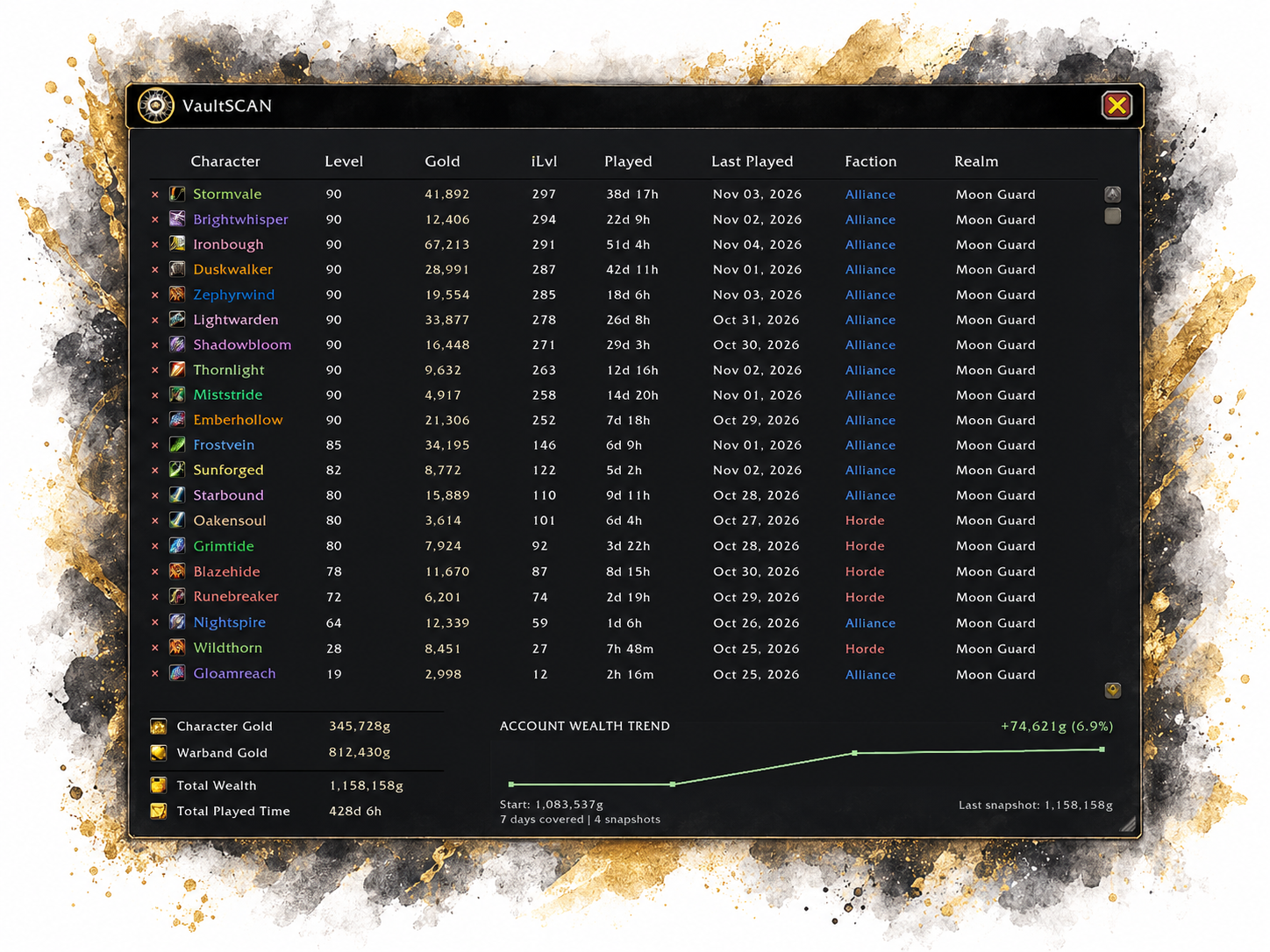
- View individual character gold, combined character gold, Warband Bank gold, and total wealth.
- Follow recorded account wealth with a rolling 30-day trend graph and a gain/loss summary.
- Hover over recorded points to see the snapshot date, saved balance, and change from the previous snapshot.
- View how many days and snapshots are represented, along with starting and last-recorded totals.
- Preserve the last recorded Warband balance if verification is unavailable; mark estimated totals clearly.
- Automatically attempt bank verification, with a fallback reminder when a bank visit is needed for a new daily snapshot.
Character dashboard
- View tracked characters across realms with class-colored names, class icons, level, item level, faction, and last-played date.
- Sort columns, resize the window, and remove obsolete tracking entries without touching actual game characters.
- See weekly recorded item-level history in a tooltip.
Playtime and interface
- Review recorded playtime per character and combined time across your tracked roster.
- Access the dashboard using a draggable minimap button or the /vaultscan chat command.
- Enjoy a dark, minimalist standalone UI with recognizable game icons and clear wealth statistics.
v1.0.0 changelog / what’s new
- Introduced account wealth history with daily verified snapshots and a compact 30-day trend chart.
- Added graph point tooltips, changes between snapshots, start/last snapshot balances, and tracked-period indicators.
- Added visual gain/loss trend coloring and individually plotted history points.
- Added Warband Bank verification safeguards to avoid treating unavailable data as verified zero gold.
- Added automatic verification attempts and an at-most-once-per-day fallback reminder when a snapshot requires bank access.
- Added last-recorded and estimated-status labels for cached Warband balances, with smaller supporting text.
- Clarified the difference between current account totals and the last fixed daily wealth snapshot.
- Refined dashboard readability, including left-aligned table content, enlarged character names, and iconic footer labels.
- Updated minimap tooltip branding to match Kilobytes Development’s companion addon style.
- Retained local SavedVariables storage and standalone functionality.
Installation & Setup
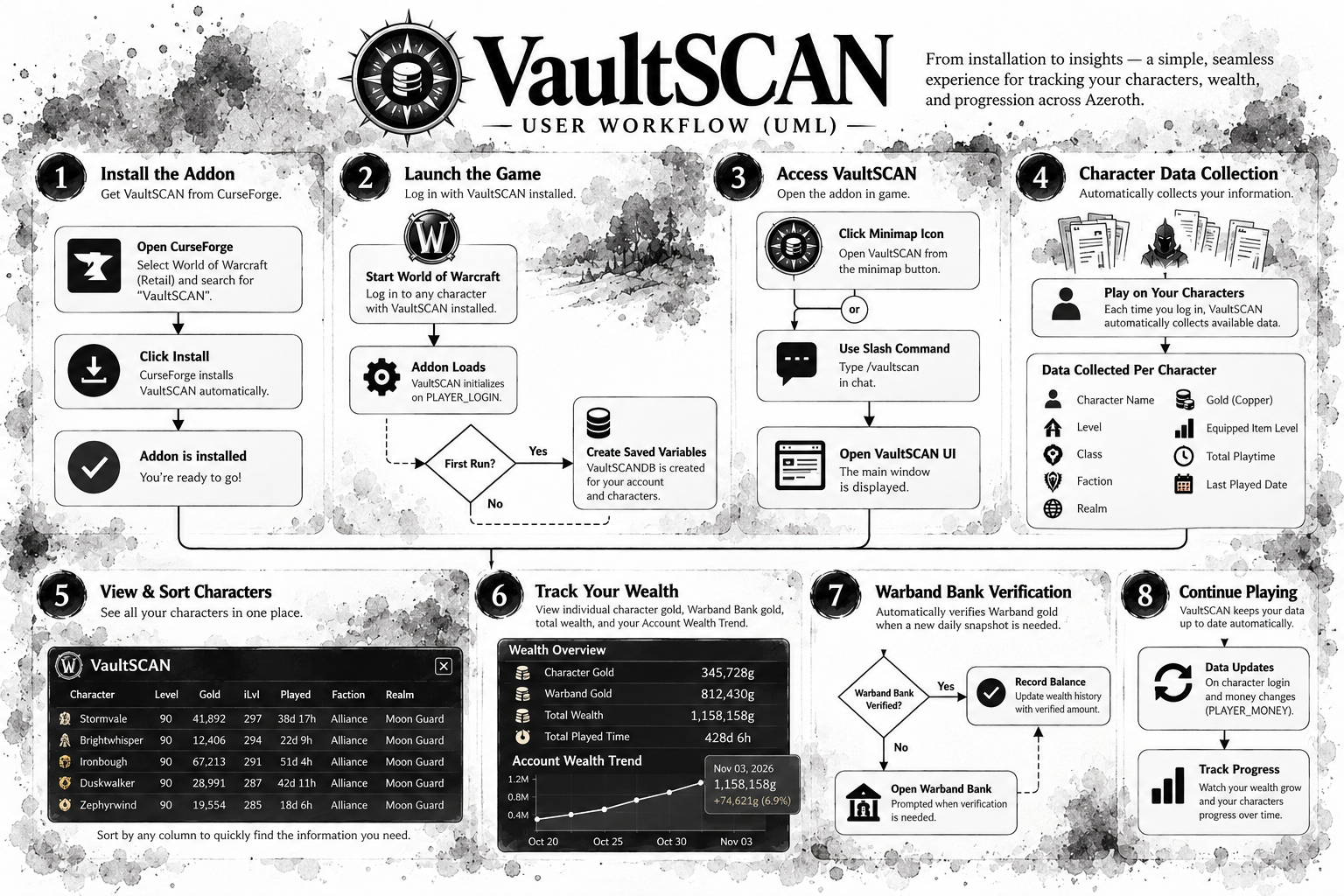
Install VaultSCAN through the CurseForge app for World of Warcraft Retail, or install the release ZIP manually.
- Log into each character you want to track so VaultSCAN can record its available information.
- Click the minimap icon—or type /vaultscan—to open the dashboard. Drag the minimap icon to reposition it.
- Review character details, account gold, playtime, item-level history, and wealth trends.
- If a new daily wealth snapshot cannot verify your Warband balance automatically, follow the one-time reminder and visit an accessible Warband Bank.
Your data stays yours!
VaultSCAN stores your character information locally using World of Warcraft's built-in SavedVariables system.
- No external accounts or registrations required.
- No third-party services or connections.
- No external servers collecting your character information.
- Your saved data remains on your computer as part of your World of Warcraft addon settings.
VaultSCAN — Less managing. More adventuring.
| Acquired Skills | Summary |
|---|---|
| World of Warcraft Addon Development | Building and releasing an independently developed addon for WoW Retail |
| Product Design & Feature Planning | Bringing character information, wealth, and playtime together around a clear player need |
| User Interface Design | Creating a minimalist dashboard with readable information, class colors, and character icons |
| User Experience Design | Reducing character switching, manual tracking, and unnecessary configuration |
| Data Aggregation & Reporting | Combining character gold, Warband wealth, and recorded playtime into an account overview |
| Local Data Persistence | Saving character information through World of Warcraft’s SavedVariables system |
| Automated Data Collection | Collecting and updating available character statistics without manual data entry |
| Interactive Interface Development | Providing a movable, resizable dashboard, draggable minimap button, and slash command |
| Privacy-Conscious Application Design | Keeping player information locally without external accounts or servers |
| Software Distribution & Release Management | Publishing downloadable, versioned releases through CurseForge |
| Technical Documentation & User Onboarding | Writing installation instructions and a walkthrough of the addon’s main interactions |
| Product Messaging & Feature Communication | Explaining features, benefits, compatibility, and data handling in accessible language |
| Acquired Skills | Summary |
|---|---|
| Front-End Web Application Development | Building an interactive planning calculator with HTML, CSS, and JavaScript through an AI-assisted development workflow. |
| Product Design & Requirements Analysis | Translating player needs into templates, guided setup, customizable base plans, and actionable packing lists. |
| User Experience Design | Simplifying decisions through recommended defaults, activity selection, and a packing-first results view. |
| Responsive User Interface Design | Creating a consistent branded interface with readable typography, clear controls, and layouts that adapt to smaller screens. |
| Conditional Workflows & Recommendation Logic | Adapting suggested components to player activities, refining preferences, faction choices, and base footprints. |
| Calculation Logic & Data Aggregation | Combining construction recipes, material reserves, rounding rules, and available stock into a consolidated packing list. |
| SVG Graphics & Data Visualization | Presenting base footprints and structural quantities through responsive diagrams and coordinated interface icons. |
| Local Data Persistence & Data Portability | Saving plans in browser storage and supporting JSON import/export, backups, and compatibility with earlier saved plans. |
| WordPress & Divi Integration | Packaging the app for a Divi Code module with scoped styles and a self-contained implementation. |
| Quality Assurance & Software Validation | Checking calculations, user workflows, responsive behavior, and saved-plan compatibility through regression and browser testing. |
| Software Release Management | Organizing versioned builds, incorporating feedback, and distributing standalone and WordPress-ready release packages. |
| Technical Documentation & User Onboarding | Writing installation instructions, release notes, and clear explanations of features, data sources, and calculation assumptions. |
Lua Development · Product Design · Software Architecture · UI/UX Design · API Integration · Event-Driven Programming · Data Processing · Local Data Persistence · Quality Assurance · Debugging · Git · GitHub · Release Management · Technical Documentation