
KiloBytes.dev
Where passion inspires adventure.
v0.7.1 BETA is now available.
v0.7.1 BETA is now available.
Listen your way with the MusicSCAN add-on.
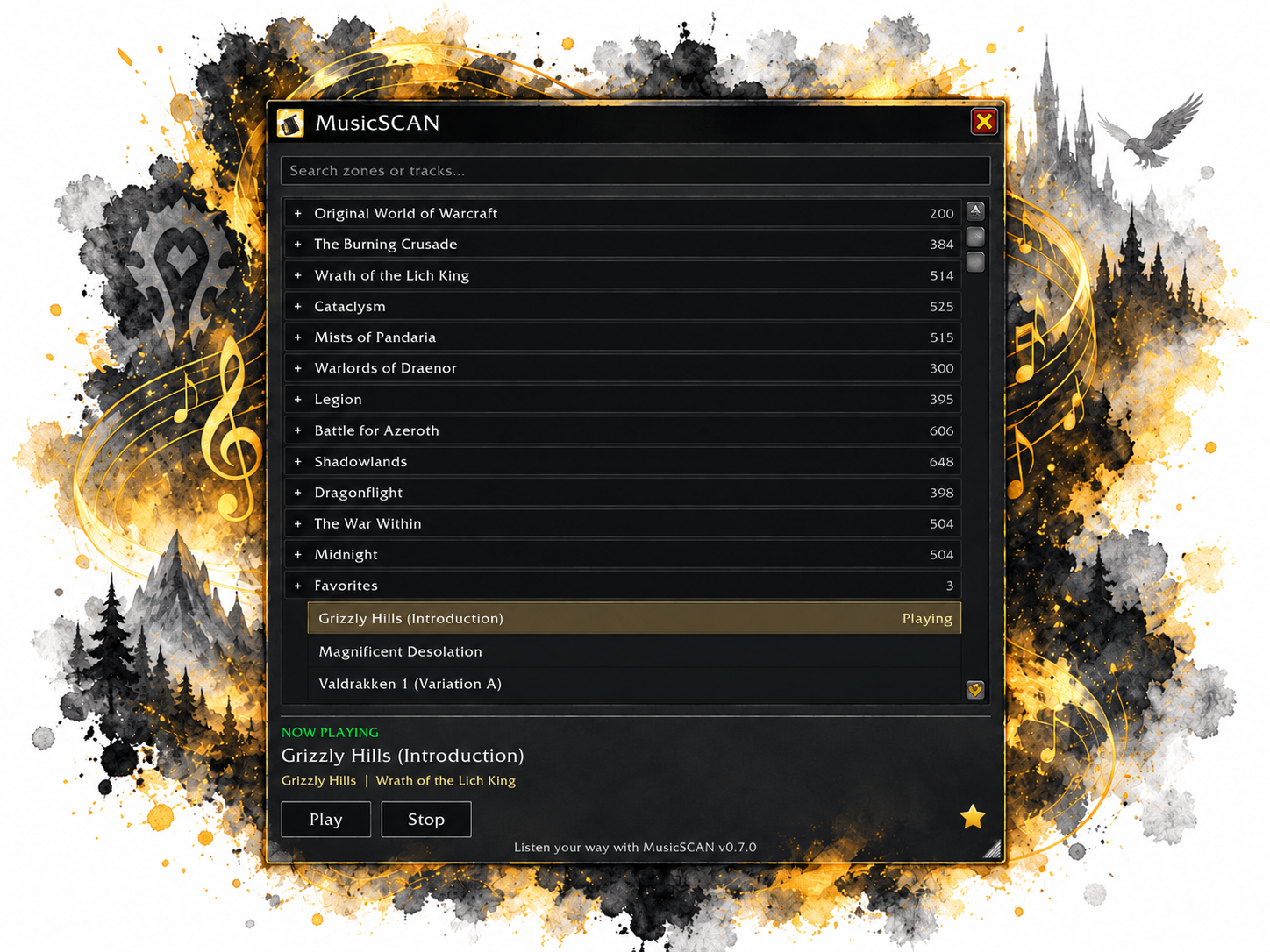
Bring your favorite Blizzard zone music with you. MusicSCAN is a standalone World of Warcraft Retail addon that lets you choose built-in music wherever you are in Azeroth. Listen to Grizzly Hills while standing in Stormwind, or settle in with Magnificent Desolation from Warlords of Draenor.
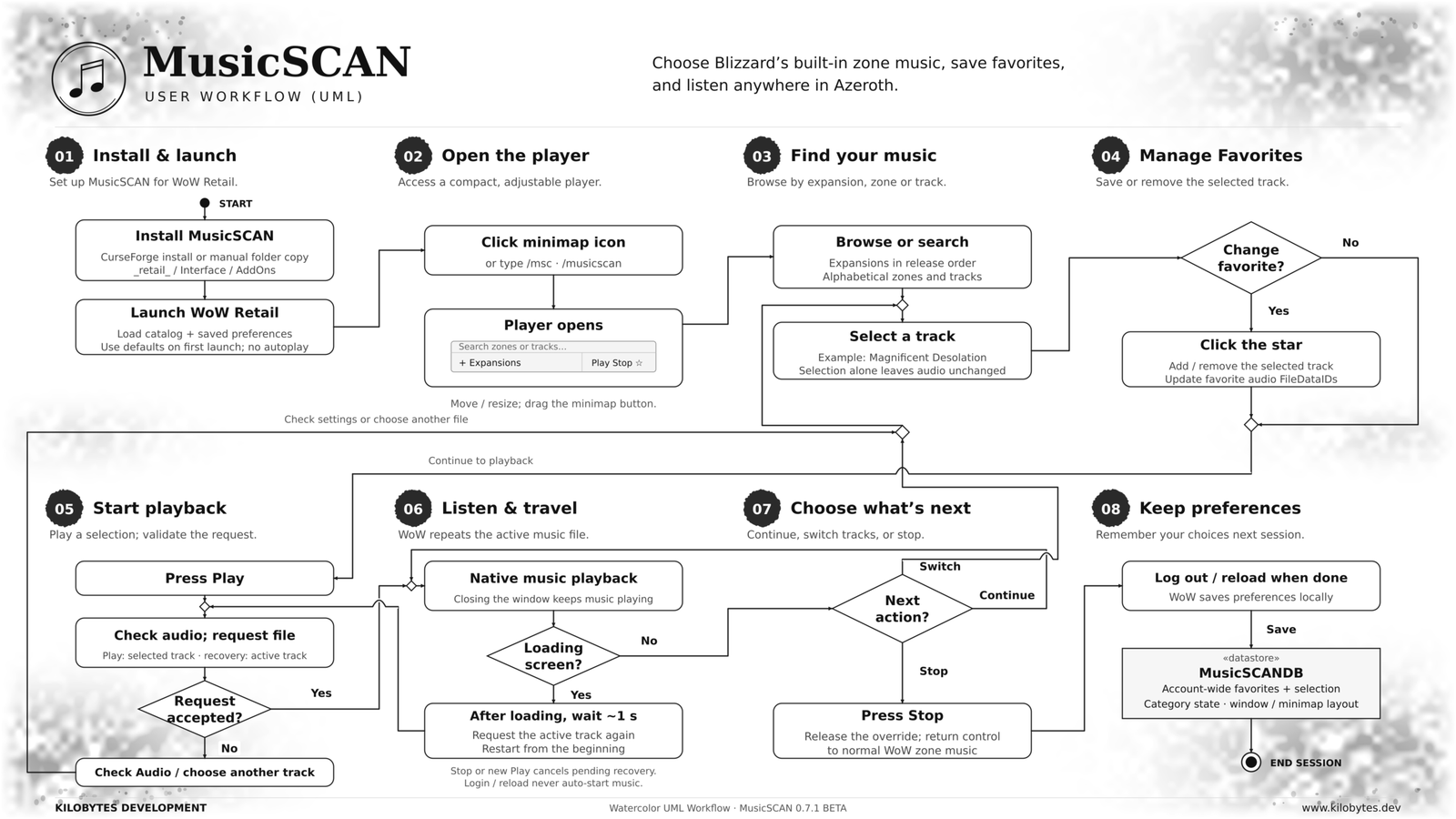
Choose a track and press Play. Press Stop to return control to WoW's normal zone music. Less configuring. More listening.
Features

Browse All Expansions

Built-in Search

Save Favorites

Resizable Window

Quick Play Options

5,500+ WoW Songs
Designed for Adventurers
MusicSCAN was built around a simple philosophy: useful information shouldn't require complicated menus, excessive configuration, or unnecessary distractions.
Whether you're a casual adventurer, dedicated collector, or longtime alt enthusiast, MusicSCAN helps you immerse your self in the world of Azeroth and explore new music you may have never experienced before in game.
Compatibility
Game: World of Warcraft Retail
Planned Release: MusicSCAN v0.7.0
Interface: Lightweight, standalone addon
Dependencies: None
Privacy & Data
VaultSCAN stores your tracking information locally using World of Warcraft's built-in SavedVariables system.
No external accounts, third-party servers, audio files, or additional services are required.
Development & Feedback
Independently developed by Developer_SCAN
Kilobytes Development
info@kilobytes.dev
Browse across expansions.
- Explore 5,493 individual music-file entries across 12 expansion categories, from Original World of Warcraft through Midnight.
Find music quickly.
- Expansions follow release order; zones and tracks are alphabetical. Expand or collapse categories and search by title, zone or expansion.
Keep your favorites.
- Click the star to save the highlighted track. The alphabetical Favorites category sits below the expansions and remembers your saved tracks across reloads.
Make room for listening.
- Move the compact charcoal player by its title bar and resize from the bottom-right grip. The minimap launcher is draggable too.
Pick up where you left off.
- Account-wide preferences remember your selection, favorites, category folds, window layout and minimap placement. Login and reload do not start playback automatically.
Use the music already in WoW.
- No addon dependencies or bundled audio. MusicSCAN makes no network requests and leaves your global audio settings unchanged.
In-Game Commands
| /musicscan /msc | Open or close the player. |
| /musicscan play /msc play | Start or restart the highlighted track. |
| /musicscan stop /msc stop | Release the MusicSCAN override and return music control to WoW. |
| /musicscan reset /msc reset | Restore the default window size and position and minimap placement; show the player. Keep favorites and selection. |
| /musicscan help /msc help | Print the command summary. Unknown command text also shows help. |
- Download MusicSCAN-0.7.0-BETA.zip, the installable release asset.
- Exit World of Warcraft.
- Extract the MusicSCAN folder into World of Warcraft/_retail_/Interface/AddOns/.
- Check that the final path is AddOns/MusicSCAN/MusicSCAN.toc, without an extra nested folder.
- Launch Retail and enable MusicSCAN in the character-selection AddOns list.
- Open the player using its minimap button or /musicscan. Select a track, then click Play.
Use the installable release ZIP rather than GitHub's automatic source-code archive.
| Acquired Skills | Summary |
|---|---|
| World of Warcraft Addon Development | Building a standalone WoW Retail music player using native Blizzard interfaces and audio APIs |
| Lua Development & Software Architecture | Separating music data, playback functions, commands, and interface code into maintainable Lua modules |
| Product Design & Feature Planning | Defining a focused music player around simple playback, searchable browsing, and saved favorites |
| User Interface Design | Creating a compact, movable, resizable player with clear controls and consistent Kilobytes Development styling |
| User Experience Design | Simplifying music discovery through search, collapsible expansion categories, alphabetical browsing, and favorites |
| Data Processing & Catalog Management | Filtering and organizing 5,493 music-file entries while preserving source references and distinct track variations |
| API Integration & Event-Driven Programming | Integrating Blizzard music APIs and loading-screen events to restore active playback after travel |
| Local Data Persistence | Saving favorites, track selections, window preferences, and minimap placement through WoW’s SavedVariables system |
| Quality Assurance & Troubleshooting | Testing playback, loading-screen recovery, saved preferences, and interface behavior through local checks and in-game validation |
| Privacy-Conscious Application Design | Keeping preferences locally and using installed game audio without external accounts, streaming, or network requests |
| Version Control & Release Management | Managing source code with Git and GitHub over SSH and preparing versioned beta packages for distribution |
| Technical Documentation & User Onboarding | Writing installation instructions, slash-command references, patch notes, and guidance for using the player |
| Product Messaging & Feature Communication | Explaining MusicSCAN’s features, compatibility, and beta limitations through website copy and release documentation |
| Acquired Skills | Summary |
|---|---|
| Front-End Web Application Development | Building an interactive planning calculator with HTML, CSS, and JavaScript through an AI-assisted development workflow. |
| Product Design & Requirements Analysis | Translating player needs into templates, guided setup, customizable base plans, and actionable packing lists. |
| User Experience Design | Simplifying decisions through recommended defaults, activity selection, and a packing-first results view. |
| Responsive User Interface Design | Creating a consistent branded interface with readable typography, clear controls, and layouts that adapt to smaller screens. |
| Conditional Workflows & Recommendation Logic | Adapting suggested components to player activities, refining preferences, faction choices, and base footprints. |
| Calculation Logic & Data Aggregation | Combining construction recipes, material reserves, rounding rules, and available stock into a consolidated packing list. |
| SVG Graphics & Data Visualization | Presenting base footprints and structural quantities through responsive diagrams and coordinated interface icons. |
| Local Data Persistence & Data Portability | Saving plans in browser storage and supporting JSON import/export, backups, and compatibility with earlier saved plans. |
| WordPress & Divi Integration | Packaging the app for a Divi Code module with scoped styles and a self-contained implementation. |
| Quality Assurance & Software Validation | Checking calculations, user workflows, responsive behavior, and saved-plan compatibility through regression and browser testing. |
| Software Release Management | Organizing versioned builds, incorporating feedback, and distributing standalone and WordPress-ready release packages. |
| Technical Documentation & User Onboarding | Writing installation instructions, release notes, and clear explanations of features, data sources, and calculation assumptions. |
Lua Development · Product Design · Software Architecture · UI/UX Design · API Integration · Event-Driven Programming · Data Processing · Local Data Persistence · Quality Assurance · Debugging · Git · GitHub · Release Management · Technical Documentation