
KiloBytes.dev
Where passion inspires adventure.

Dune: Awakening
Deep Desert Building Planner
Web application // javascript project.
Feature Summary

Track Progress

Download / Print

Save For Later

Backup JSONs

Responsive Layout

No Registration
DuneSCAN v0.7.0 BETA
-----
Save time and pack with purpose.
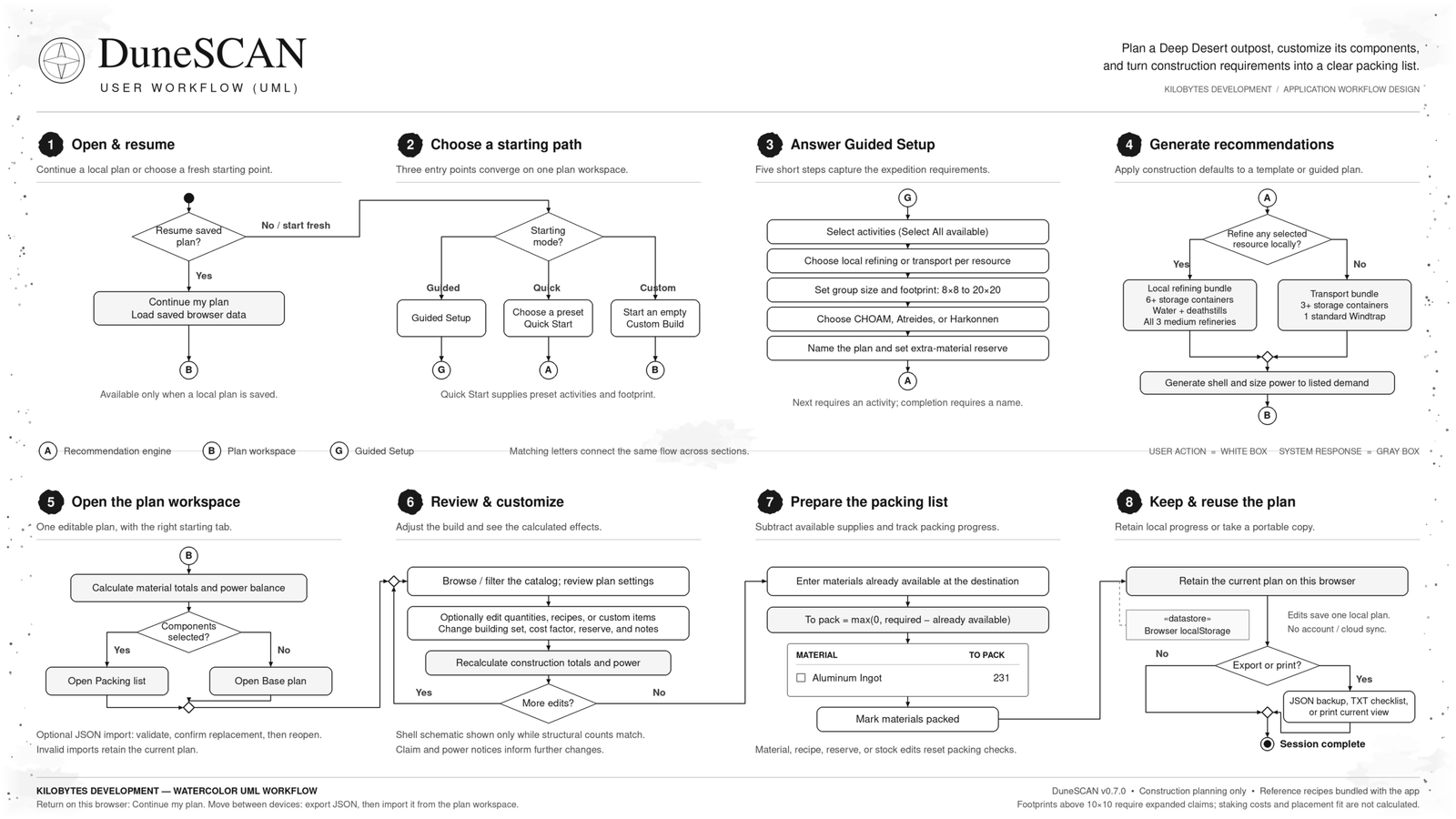
Your next Deep Desert outpost starts with a plan. DuneSCAN helps you turn your Dune: Awakening activities, building preferences, and refining choices into a construction-material packing list you can customize. Start with a template, follow the guided setup, or build your own plan from scratch. Adjust your components, account for materials already at your destination, and add a reserve before you head out.
From planning to packing
Completed plans open directly on the packing list, showing required materials, available stock, and the quantities you still need to bring.
Track your progress: Check off materials as you pack.
- Download or print: Keep a text checklist or printed packing list nearby.
- Continue later: Return to your current plan using the same site and browser.
- Back up and share: Export plans as JSON, share the files, or import them on another device. Earlier AdventureSCAN plans remain compatible.
- Use your preferred screen: Responsive layouts support desktop and mobile use, with keyboard-accessible controls.
Stay focused: No ads, account registration, or game login required.
A focused construction planner
DuneSCAN calculates base-construction inputs using a selected building catalog. Its diagrams are planning aids; confirm claim coverage, recipes, unlocks, and equipment placement for your build. Plans above 10×10 require expanded claimed land, and staking units are not currently included in material totals. Operating fuel and water consumption, refining throughput, vehicle parts, weapons, armor, and harvested return cargo are outside the current calculator. PvP selections do not generate a validated defensive layout.
DuneSCAN is an independent fan project by KiloBytes.dev and is not affiliated with Funcom or Legendary.
Three ways to get started
| Planning mode | How it works |
|---|---|
| 1.) Quick Start | Choose an explorer’s staging camp, spice-processing outpost, or resource-expedition base, then make it your own. |
| 2.) Guided Setup | Work through five steps covering your activities, refining locations, group size, footprint, building set, plan name, and material reserve. |
| 3.) Custom Build | Begin with an empty plan and choose your own components and quantities. |
Built around your expedition
Combine spice, titanium, stravidium, and flour-sand harvesting with laboratory exploration, shipwrecks, or PvP activities. Choose individual activities or select them all. For supported resources, decide whether to refine in the Deep Desert or transport your harvest back to Hagga Basin.
Those choices influence the suggested equipment and power requirements.
| Feature | What you can do |
|---|---|
| Six base footprints | Plan an 8×8, 9×9, 10×10, 12×12, 15×15, or 20×20 foundation footprint. Larger plans identify the need for expanded claimed land. |
| Faction building sets | Choose CHOAM Shelter, Atreides Stronghold, or Harkonnen Stronghold, with corresponding structural names and material costs. |
| Named plans | Give your expedition a recognizable name and specify how many players will share the base. |
| Editable building catalog | Search and filter the current selection of structures, utilities, storage, power equipment, and refineries. Adjust quantities as your plans develop. |
| Custom components | Add components with their own construction materials and power values. |
| Suggested base schematic | Review a square foundation layout with perimeter walls, an entrance, roof counts, and an equipment key. |
| Combined material totals | Bring construction requirements together in one list that updates as you edit. |
| Extra-material reserve | Add 0–100% extra materials without changing your base footprint. |
| Available-stock tracking | Subtract materials already waiting at your destination or supplied by teammates. |
| Adjustable recipes and costs | Edit component recipes or apply a construction cost factor to reflect confirmed requirements for your build. |
| Power-balance summary | Review the listed power supply and demand for selected equipment. Guided plans suggest generation for the included consumers. |
| Acquired Skills | Summary |
|---|---|
| Front-End Web Application Development | Building an interactive planning calculator with HTML, CSS, and JavaScript through an AI-assisted development workflow. |
| Product Design & Requirements Analysis | Translating player needs into templates, guided setup, customizable base plans, and actionable packing lists. |
| User Experience Design | Simplifying decisions through recommended defaults, activity selection, and a packing-first results view. |
| Responsive User Interface Design | Creating a consistent branded interface with readable typography, clear controls, and layouts that adapt to smaller screens. |
| Conditional Workflows & Recommendation Logic | Adapting suggested components to player activities, refining preferences, faction choices, and base footprints. |
| Calculation Logic & Data Aggregation | Combining construction recipes, material reserves, rounding rules, and available stock into a consolidated packing list. |
| SVG Graphics & Data Visualization | Presenting base footprints and structural quantities through responsive diagrams and coordinated interface icons. |
| Local Data Persistence & Data Portability | Saving plans in browser storage and supporting JSON import/export, backups, and compatibility with earlier saved plans. |
| WordPress & Divi Integration | Packaging the app for a Divi Code module with scoped styles and a self-contained implementation. |
| Quality Assurance & Software Validation | Checking calculations, user workflows, responsive behavior, and saved-plan compatibility through regression and browser testing. |
| Software Release Management | Organizing versioned builds, incorporating feedback, and distributing standalone and WordPress-ready release packages. |
| Technical Documentation & User Onboarding | Writing installation instructions, release notes, and clear explanations of features, data sources, and calculation assumptions. |
| Acquired Skills | Summary |
|---|---|
| Front-End Web Application Development | Building an interactive planning calculator with HTML, CSS, and JavaScript through an AI-assisted development workflow. |
| Product Design & Requirements Analysis | Translating player needs into templates, guided setup, customizable base plans, and actionable packing lists. |
| User Experience Design | Simplifying decisions through recommended defaults, activity selection, and a packing-first results view. |
| Responsive User Interface Design | Creating a consistent branded interface with readable typography, clear controls, and layouts that adapt to smaller screens. |
| Conditional Workflows & Recommendation Logic | Adapting suggested components to player activities, refining preferences, faction choices, and base footprints. |
| Calculation Logic & Data Aggregation | Combining construction recipes, material reserves, rounding rules, and available stock into a consolidated packing list. |
| SVG Graphics & Data Visualization | Presenting base footprints and structural quantities through responsive diagrams and coordinated interface icons. |
| Local Data Persistence & Data Portability | Saving plans in browser storage and supporting JSON import/export, backups, and compatibility with earlier saved plans. |
| WordPress & Divi Integration | Packaging the app for a Divi Code module with scoped styles and a self-contained implementation. |
| Quality Assurance & Software Validation | Checking calculations, user workflows, responsive behavior, and saved-plan compatibility through regression and browser testing. |
| Software Release Management | Organizing versioned builds, incorporating feedback, and distributing standalone and WordPress-ready release packages. |
| Technical Documentation & User Onboarding | Writing installation instructions, release notes, and clear explanations of features, data sources, and calculation assumptions. |
Front-End Development · Product Design · Requirements Analysis · UX Design · UI Design · JavaScript · HTML · CSS · Software Testing · Technical Documentation · WordPress · Release Management